
Course → 2.3 Team Context Folder
Lesson 2.3 of the Free Claude Cowork Course · 25 minutes
Overview
Here’s where this course goes beyond solo use. When five people each use Cowork alone, you get five styles of output and five sets of habits. A team context folder fixes that: one shared location holding your templates, terminology, standards, and examples of “good” — so everyone’s Cowork starts from the same knowledge. It’s the single highest-leverage team move in this entire course.
What You’ll Do
✓
Build a team context folder structure from the included starter kit
✓
Write the top-level context file that describes your team in plain language
✓
Test it: run the same brief with and without the context folder and compare
The Lesson
Say “start lesson 2.3”. First run the weekly digest using only scenarios/team-sim/weekly-inputs/ and preserve digest-cold.md. Then run the same task after reading the actual team-sim context, saving digest-with-context.md separately. Compare actual differences and trace them to the relevant context files. Copy the blank kit into my-team-context/, draft about/style/glossary, then test every about line against an output and cut lines that change nothing. The worked walkthrough uses a clearly labelled fictional demo team; actual learners can supply their own real details privately.
The lesson closes with the maintenance question — who owns this folder and how it stays current — because an unowned context folder quietly rots.
Try It Now
Draft the context file for your real team, even in rough form: five sentences about who you are, your three most-used templates, and ten terms an outsider wouldn’t know. Rough and real beats polished and hypothetical.
Follow the exercise: cold run, context run, source trace, demo kit, line review
Follow a real Claude Desktop exercise with synthetic course data: a scoped cold digest uses only the two weekly-input files, then materially the same task uses the actual team-sim context. This is an existing long conversation, not a reset-memory or controlled scientific experiment. Compare real outputs against their sources, then start a fictional demo team folder from the actual kit and apply the earn-its-place edit to a genuine saved draft. The learner substitutes their own real details privately; these pages disclose no real team information. Native PNGs are privacy-cropped without resampling, with red primary/yellow supporting highlights and full-size links for small text.
1. Scope the cold run before reading context
Use only the two files in weekly-inputs for the first digest and preserve its result. Exclude earlier outputs, context policies and prior conversation assumptions from the source scope. This is a scoped cold run in the existing long conversation, not proof of erased memory or a controlled scientific experiment.
From scenarios/team-sim/weekly-inputs/, write a weekly client status digest. Read only meeting-notes-week.md and pipeline.csv. Save as digest-cold.md; do not use other context or earlier outputs.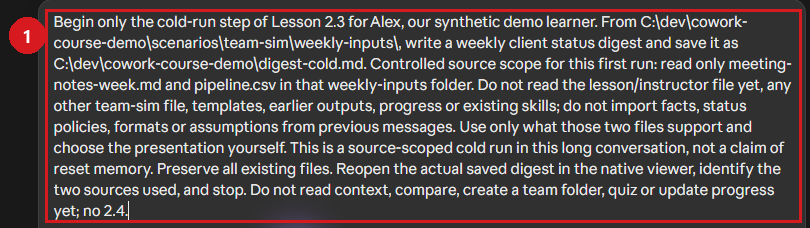
2. Preserve the actual cold digest
The actual first result uses client and pipeline tables without the team playbook's colored status format or decision ending. It already retains Ozark's Friday Monday-call/conditional-cold fact, so that fact cannot later be attributed only to context. The source note and unknown date are explicit. Preserve the whole file byte-for-byte before the next run.

3. Inspect the real context-assisted result
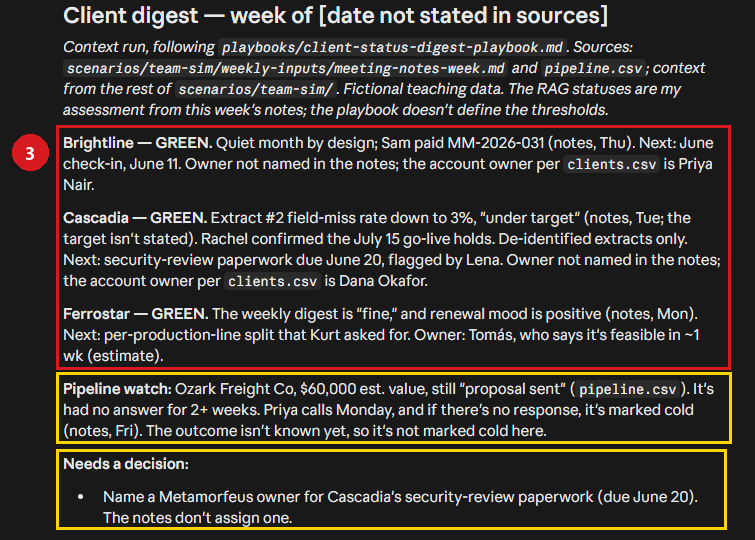
The same task now follows the actual team-sim folder: three active-client blocks, green/yellow/red vocabulary, next actions and a Needs a decision ending. Here each client has two nonblank Markdown source lines; visual wrapping varies by viewport. The actual colors are labelled assessments because thresholds are not defined. Ozark remains a conditional pipeline watch, with no invented Monday outcome. The Friday fact already appeared cold. Account owner is distinguished from an unassigned paperwork owner.
4. Trace real differences to their context sources
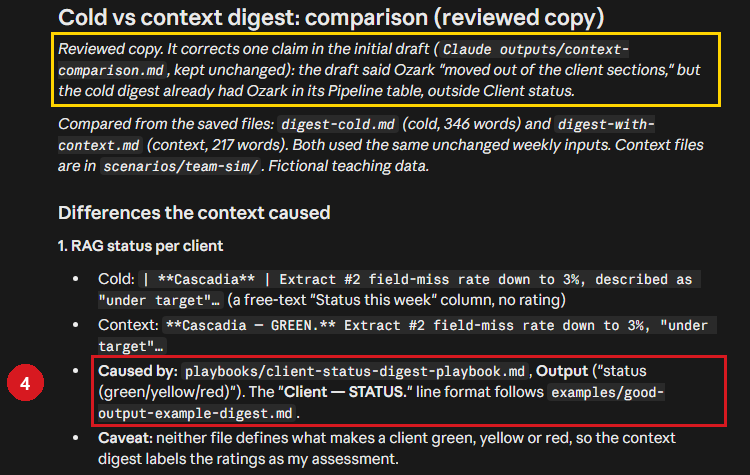
Compare the saved files, rather than predicting what should differ. Four observed changes trace to the playbook’s status format and decision ending, clients.csv account owners, and the about/glossary de-identified-extract rule. The comparison initially misdescribed Ozark as moving out of client sections; review caught that cold already kept Ozark in pipeline. A corrected separate comparison preserves the original draft and states the actual change: a four-lead table becomes a targeted pipeline watch. Colors remain assessments; account owner is not task assignment.
5. Draft the actual kit for a fictional demo team
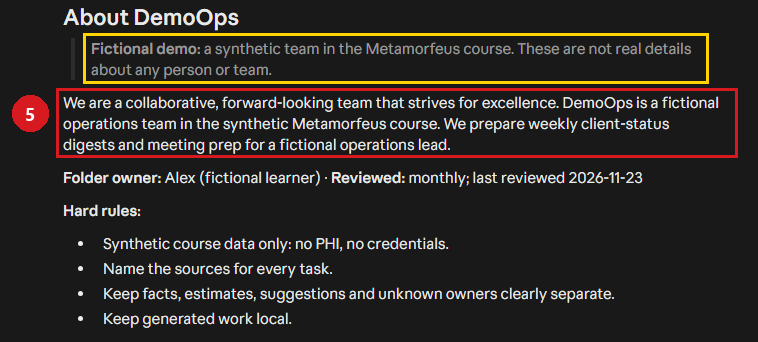
Walk about, style, glossary, playbooks and examples. Copy the real blank kit into my-team-context/, then decide team facts and terms as synthetic Alex. About, style and glossary explicitly describe fictional DemoOps, not Peter’s real team. The initial about draft includes the learner-supplied mission sentence alongside concrete work/audience, owner, review cadence and hard rules. Save context-about-before.md before editing. Actual learners can substitute their real details privately.
6. Make every instruction earn its place
For each substantive sentence, name an output it would change. The learner’s aspirational mission supplies no rule for fact selection, format or review, so remove that one sentence. The saved after file retains the concrete audience, owner/review metadata and hard rules. A separate review records before/after quotes and output tests; an exact comparison confirms every other substantive instruction is unchanged. Maintenance metadata supports clarification and source-age review, not proof of better prose by itself.

7. Review the usable style and glossary drafts
The saved style guide shown here gives output-shaping rules: named sources, estimate labels, the five-line cap for client blocks, status assessment caveats, red recovery actions, owner distinctions and the decision ending. The separate glossary defines six fictional team terms, including client digest, pipeline watch and cold. About/style/glossary are all drafted from the actual kit; the README/playbooks/examples skeletons remain intact. No private real-team information is used.

Completion and image boundary
The three quiz answers were evaluated individually and the saved progress file records Lesson 2.3 complete, quiz 3/3. Only that row changed; earlier lessons, the Part 1 milestone and capstone remain unchanged, and 2.4–2.5 are blank. The final completion image is omitted because the interactive desktop disconnected and the supported capture recovery failed. Seven authentic reviewed images cover the exercise; no eighth image was invented.
What’s Next
← Previous: 2.2 Plugins and Skills
Next: 2.4 Shared Workflows →
New here? Download the full course free on GitHub.
Rolling this out for a whole team? See our live team training.
New here? Download the full course free on GitHub.